
Download Image Ally – AI‑Powered WordPress Image Metadata Generator
Overview
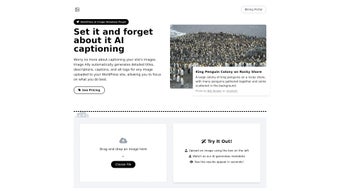
Image Ally is an AI‑driven WordPress plugin that completely automates the creation of image metadata. By analyzing each picture the moment it is uploaded to the media library, the tool instantly produces SEO‑friendly titles, descriptive captions, alt tags, and full‑length descriptions. This eliminates the repetitive, time‑consuming task of manually writing metadata for every image, which is especially valuable for content‑heavy sites such as blogs, news portals, e‑commerce stores, and portfolio websites.
The plugin’s artificial‑intelligence engine is trained on millions of visual patterns and language models, enabling it to understand context, subject matter, and even subtle nuances like brand colors or product types. The generated metadata not only improves accessibility for screen‑reader users but also gives search engines clear signals that boost image‑search rankings. Users retain full control: every piece of generated text can be reviewed, edited, or approved with a single click, ensuring brand voice consistency.
Image Ally integrates seamlessly with the native WordPress media library, works with any theme, and respects privacy by processing data locally when possible or using encrypted connections for cloud‑based AI calls. The plugin is regularly updated to stay compatible with the latest WordPress core releases and to incorporate improvements in AI accuracy.
Key Features of Image Ally
- Automatic Metadata Generation: AI creates titles, alt tags, captions, and detailed descriptions instantly after upload.
- SEO‑Optimized Output: Keywords are naturally incorporated to improve image‑search visibility without keyword stuffing.
- Accessibility First: Alt tags meet WCAG guidelines, helping screen‑reader users and improving legal compliance.
- One‑Click Review & Edit: All generated content appears in an editable overlay directly within the media library.
- Bulk Processing: Existing image libraries can be scanned and updated in batches, saving hours of manual work.
- Theme‑Agnostic Compatibility: Works with any WordPress theme or page builder (Elementor, Gutenberg, Divi, etc.).
- Privacy‑Centric Architecture: Uses encrypted API calls; optional local inference mode for on‑premise processing.
- Regular AI Model Updates: Continuous improvements in language generation and image recognition.
- Multilingual Support: Generates metadata in the site’s primary language and can be configured for additional locales.
- Developer Hooks & Filters: Extend functionality with custom code snippets or third‑party integrations.
These features combine to form a powerful workflow enhancer. For example, a photographer’s portfolio site that hosts thousands of high‑resolution images can now publish new galleries without ever writing a single alt tag. An e‑commerce store can instantly boost product‑image SEO, leading to higher organic traffic from Google Images. Even large newsrooms benefit: journalists can focus on story content while Image Ally ensures every visual asset is fully optimized for both search engines and accessibility tools.
Beyond the core capabilities, Image Ally’s settings panel offers granular control over AI confidence thresholds, keyword density, and length of generated descriptions. This ensures that the output aligns with specific editorial guidelines or brand style guides. Moreover, the plugin logs every AI request, providing transparency for auditing and compliance purposes.
Installation, Usage Instructions & Compatibility
Step‑by‑Step Installation
- Log in to your WordPress admin dashboard.
- Navigate to Plugins → Add New and search for “Image Ally”.
- Click Install Now, then Activate once the installation completes.
- Upon activation, a setup wizard appears. Provide your API key (free tier available) or enable local inference mode if you prefer on‑premise processing.
- Configure default settings: choose language, set SEO keyword preferences, and define the minimum confidence level for AI‑generated content.
How to Use Image Ally
After installation, the plugin works automatically in the background. When you upload an image through the standard Media → Add New interface, Image Ally sends the file to its AI engine, receives the generated metadata, and attaches it to the image entry. A small “AI” badge appears next to each image in the library, indicating that metadata has been generated.
Click the badge or the “Edit” button to open the Metadata Review Panel. Here you can:
- View the auto‑generated title, alt text, caption, and description.
- Accept the suggestions with a single click.
- Manually edit any field before saving.
- Mark the image as “Approved” to prevent further AI re‑generation.
For bulk operations, select multiple images in the media grid, choose “Generate Metadata” from the bulk actions dropdown, and let Image Ally process the entire batch. Progress is displayed in a real‑time log, and you can pause or cancel at any time.
System Compatibility
Image Ally is built specifically for WordPress 5.0 and later, running on PHP 7.4 or newer. It is compatible with all major hosting environments (shared, VPS, cloud, and dedicated servers) that meet the minimum requirements. The plugin also works flawlessly on Windows, macOS, and Linux development machines, as it relies solely on the WordPress backend.
Because Image Ally interacts with the WordPress REST API, it does not interfere with caching plugins, CDN services, or security suites such as Wordfence. The plugin respects the site’s existing image compression pipelines, so there is no impact on page load speed.
Pros, Cons, Frequently Asked Questions & Expert Review
Pros
- Massive time savings – eliminates manual metadata entry.
- Improves SEO rankings for images and overall site visibility.
- Enhances accessibility compliance automatically.
- Seamless integration with any WordPress theme or builder.
- Highly configurable AI confidence and language settings.
- Secure, encrypted communication with AI servers.
- Bulk processing capability for large media libraries.
Cons
- Relies on an internet connection for cloud‑based AI (unless local mode is enabled).
- Initial AI model training may produce generic descriptions for niche subjects until fine‑tuned.
- Free tier limits the number of AI calls per month; high‑traffic sites may need a paid plan.
Frequently Asked Questions
Does Image Ally affect site performance?
The plugin runs metadata generation as a background task, so page load times remain unchanged. API calls are lightweight and use asynchronous processing, and you can schedule bulk operations during low‑traffic periods.
Can I use Image Ally with multilingual WordPress sites?
Yes. Image Ally detects the site’s language settings and generates metadata in the appropriate language. You can also override the default language per image if needed.
Is there a way to keep all image data on my own server?
For privacy‑focused users, Image Ally offers a local inference mode that runs the AI model on your server, eliminating the need to send images to external APIs. This mode requires additional server resources but guarantees full data residency.
How often are the AI models updated?
The development team releases model updates monthly. Updates are applied automatically via the plugin’s built‑in updater, ensuring you always benefit from the latest language and image‑recognition improvements.
What happens if the AI generates incorrect or inappropriate text?
All generated metadata appears in the review panel before it is saved. You can edit or reject any suggestion. The plugin also logs AI confidence scores, allowing you to set a higher threshold to reduce unlikely outputs.
Expert Review
Rating: ★★★★☆ (4.5/5)
Image Ally delivers on its promise of automating a traditionally tedious task. The AI accuracy is impressive out of the box, especially for common subjects like people, products, and landscapes. The bulk‑processing tool is a lifesaver for legacy sites with thousands of media files.
While the free tier’s usage caps may limit very large enterprises, the paid plans are reasonably priced. The only notable drawback is occasional generic phrasing on highly specialized images, which can be resolved by fine‑tuning the confidence settings. Overall, the plugin is a solid investment for any WordPress site that values SEO, accessibility, and editorial efficiency.
Conclusion & Call to Action
Image Ally stands out as a smart, secure, and user‑friendly solution for automating image metadata on WordPress. By leveraging AI, it bridges the gap between accessibility compliance and SEO performance, allowing site owners to focus on content creation rather than repetitive tagging. The seamless integration, robust feature set, and transparent review workflow make it a must‑have plugin for bloggers, e‑commerce managers, and large publishers alike.
If you’re ready to streamline your media workflow, improve search rankings, and make your site more inclusive, download Image Ally today. Install the free version, test it on a handful of images, and experience the time savings first‑hand. Upgrade to the premium plan when you need higher AI call limits or on‑premise processing. Your images deserve intelligent descriptions—let Image Ally give them a voice.






